


We share files every day contracts, reports, patient records, and financial statements. It feels routine. But behind every shared link or email attachment is a question most businesses never ask: “Who else can see this?”
Data leaks don’t always happen because of hackers in dark rooms. More often, they happen because of a wrong email address, an open Google Drive link, or a password that was never set. The good news? Most of these risks are completely preventable.
This guide walks you through everything — why leaks happen, how to stop them, and what a truly secure file sharing setup looks like for modern businesses.
What Is a Data Leak in File Sharing?
A data leak happens when sensitive information reaches someone who was never supposed to see it. It doesn’t have to be a massive breach to cause damage. Even one misdirected file can trigger legal consequences, damage client trust, or cost you a compliance fine.
In the context of file sharing, leaks typically happen through:
- Unencrypted files sent via email or consumer apps
- Open access links that anyone with the URL can open
- Weak or no authentication on shared documents
- Uncontrolled re-sharing when a recipient forwards your file to someone else
- Zero visibility you have no idea who opened the file or when
Real-World Examples That Show the Cost of Poor File Sharing
These aren’t edge cases. They happen every week across industries.
Healthcare Firm — $2.2M Fine An employee emailed patient records to the wrong recipient. The file had no encryption, no password. That one mistake cost the firm $2.2 million in regulatory fines plus months of reputational damage.
Tech Startup — Competitor Breach A startup shared product R&D files on Google Drive with public access turned on. Competitors found and downloaded their confidential documents before anyone noticed.
Law Firm — GDPR Violation Expired credentials and missing access controls gave unauthorized users a path into client contracts. The firm failed a compliance audit and lost a major client over it.
Best Practices to Prevent Data Leaks While Sharing Files
1. Always Use End-to-End Encrypted Tools
If your file sharing tool doesn’t offer end-to-end encryption (E2EE), the files you send can be intercepted and read. Encryption ensures that even if someone grabs the file mid-transit, they can’t open it.
NFC Vault encrypts every file at upload, during transit, and in storage — so your data is never exposed at any stage.
2. Control Who Can Access What (Role-Based Permissions)
Not everyone needs access to everything. Role-Based Access Control (RBAC) lets you define exactly what each user can do (view, download, edit, or share) at the document level.
NFC Vault lets you customize user roles and set permissions per document, so access is always intentional, never accidental.
3. Put an Expiry Date on Every Shared Link
A link that stays active forever is a leak waiting to happen. Time-limiting your shared URLs means access automatically cuts off — even if you forget to revoke it manually.
With NFC Vault, setting an expiry date takes just a few clicks.
4. Password-Protect Your Files
Add one more layer of defence. Even if a link gets forwarded or leaked, a strong password keeps the file locked to everyone except the intended recipient.
NFC Vault lets you password-protect any document before sharing.
5. Track File Activity in Real Time
Knowing that you shared a file isn’t enough. You need to know who opened it, when, from where, and what they did. Real-time tracking gives you that visibility and early warning when something looks off.
NFC Vault provides full audit trails, activity logs, and real-time alerts.
6. Block Downloads, Printing, and Forwarding
For your most sensitive documents, “view only” is the safest option. It lets recipients see what they need to without being able to copy, print, or forward it.
NFC Vault supports view-only mode, watermarking, and print restrictions for confidential files.
7. Integrate with Data Loss Prevention (DLP) Tools
DLP integration stops accidental sharing of PII, financial data, or intellectual property before it leaves your system.
NFC Vault works alongside enterprise-grade DLP solutions so your existing security stack stays intact.
8. Require Multi-Factor Authentication (MFA)
Passwords alone aren’t enough anymore. MFA adds a second layer of verification so that even if login credentials are compromised, unauthorized access is still blocked.
NFC Vault includes built-in MFA for both admin and user accounts.
9. Restrict Re-sharing and Device Access
Stop recipients from forwarding documents. Limit access to specific IP addresses, devices, or locations using geofencing, especially useful for remote or distributed teams.
NFC Vault supports IP restrictions, device tracking, and geo-fencing out of the box.
10. Audit and Review Permissions Regularly
Access management isn’t a one-time setup. Run periodic reviews — check who has access to what, and clean up any expired or unnecessary permissions before they become a liability.
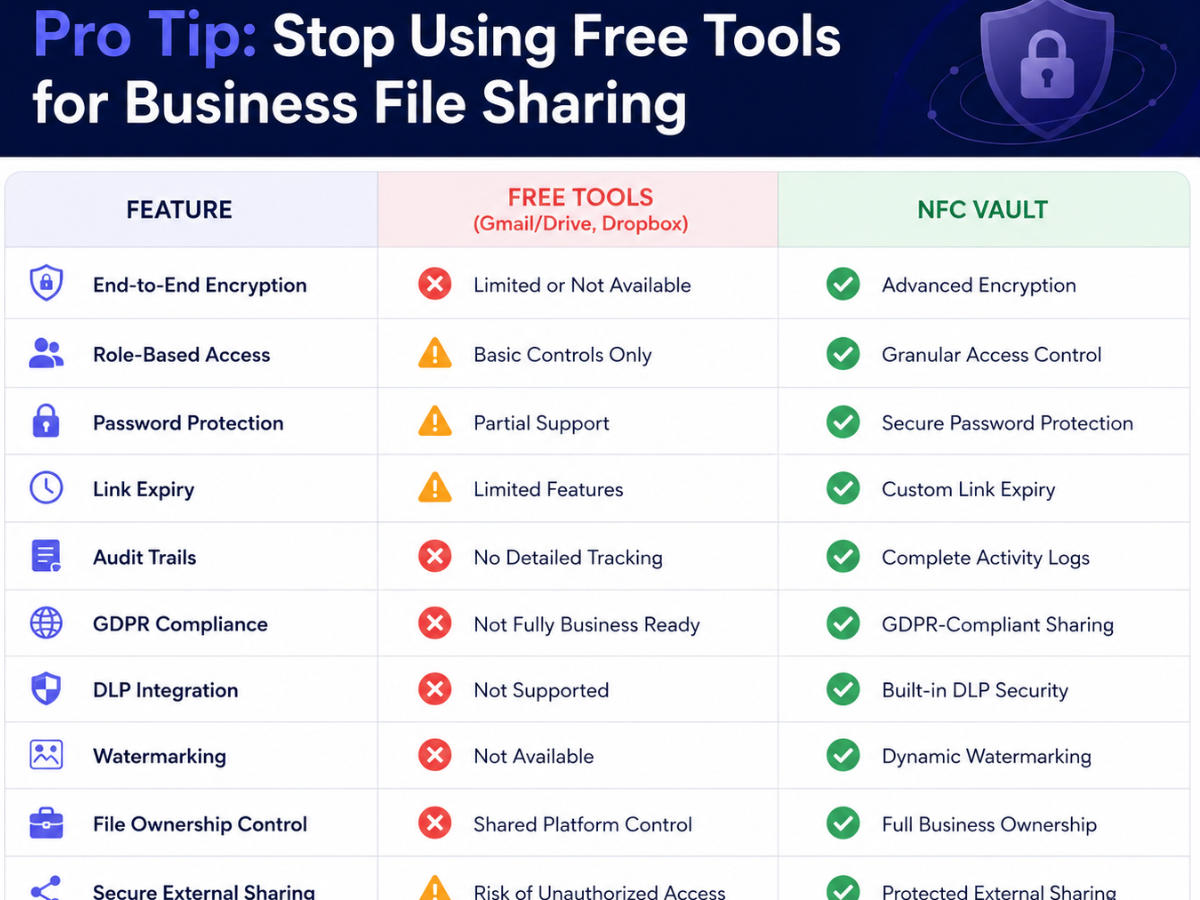
NFC Vault: Built for Secure File Sharing at Every Scale
NFC Vault isn’t just a file-sharing tool it’s a complete document security platform trusted by businesses across BFSI, healthcare, legal, government, and education sectors.
Every feature is built around one goal: giving you total control over your files, from the moment you upload them to the moment access is revoked.
- End-to-end encryption
- Role-based access control
- Expiry links and password protection
- Real-time activity tracking
- View-only mode and watermarking
- MFA, IP restriction, and geo-fencing
- DLP, SIEM, and Active Directory integrations
Final Thoughts
File sharing is unavoidable in modern business. Data leaks don’t have to be.
With the right practices, encryption, access controls, expiry links, and real-time tracking, you can share files confidently without putting your business at risk. And with a platform like NFC Vault, all of that comes built in.
Frequently Asked Questions
Q1. Can I share files externally with NFC Vault?
Yes. You can safely share files with clients, partners, and vendors with full control over what they can access and for how long.
Q2. What if a file is accidentally shared with the wrong person?
You can instantly revoke access, trigger link expiration, and apply access restrictions to contain the situation before it becomes a data leak.
Q3. Is NFC Vault suitable for small businesses?
Absolutely. NFC Vault is built to scale whether you have 5 users or 5,000, the platform grows with your business.
Q4. What integrations does NFC Vault support?
NFC Vault integrates with Active Directory, DLP tools, SIEM platforms, and more, so it works within your existing security infrastructure.